

the easiest way to download mp3 from facebook
With its continued popularity, it9s no surprise that Facebook is still used by people across countries. Facebook is popular among all groups, from adults and teenagers to children. From news, games, music and video entertainment, everything is enjoyed by its users. One of its features is the videos provided by Facebook; as Facebook users we can upload and share our videos with friends on Facebook. But what if we want to download music in mp3 format? Unfortunately Facebook doesn9t give us a feature to listen to music other than through Facebook videos. For this problem we have found a solution for those who want to download mp3 music from the videos they watch.
Get Video DownloaderYou must have an Android app that can download mp3 from Facebook
To solve the problem you are experiencing we offer the best solution: download the VidMate app. VidMate is an app that provides social networking services as well as services to download videos and mp3s available on popular social platforms like YT, Facebook and others. You can download mp3 music converted from Youtube and Facebook simply by searching the name or pasting the URL of the video and the music name.
How to download mp3 from Facebook?
Now that you know the features provided by the VidMate app, next is how to convert your favorite videos from Facebook to mp3. To avoid confusion, just follow the steps we9ve provided.
Step one. Download the VidMate app
The first step is to download the VidMate app from its official website, or you can visit it via the link we provided to go to the official site VidMate.
Step two. Open your VidMate app and open Facebook
After downloading the app, the next step is to open the Facebook feature from the VidMate app. You will be redirected to the Facebook site with added features that Facebook itself does not provide.

Step three. Find the video you want to convert to mp3
After opening the Facebook feature from VidMate, simply search for the favorite video you want to convert to mp3 by entering keywords or by opening the video9s URL. VidMate will take you to the URL link you entered.

Step four. Convert the video to mp3 via the download icon next to the video
The final step is to press the download icon provided next to the video and choose to download the video in mp3 format.
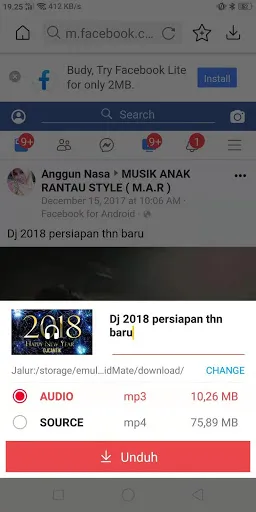
With such an easy method you surely won9t have difficulty downloading your favorite mp3s to your phone anymore. So what are you waiting for? Download VidMate now.
Get Video Downloader

